プロンプトは
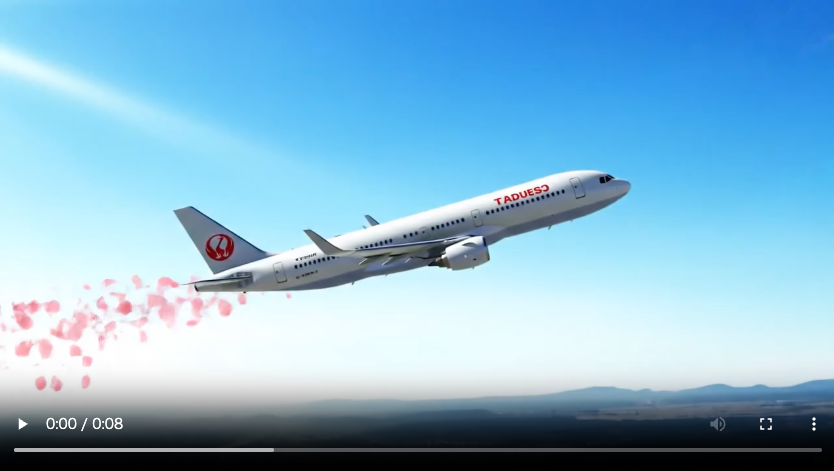
Goal: An airplane passing near Mount Fuji with cherry blossom petals spreading behind it
environment: natural and aerial
space: open sky with mountain landscape
state: dynamic and lively
location: near Mount Fuji, Japan
area_features: mountainous terrain, partially snow-capped peak, visible tree line
structure: commercial airplane, modern jetliner
cover: minimal ground vegetation, some forest areas on mountain base
decoration: cherry blossom petals trailing in the air
position: airplane in mid-flight, slightly above Mount Fuji, angled diagonally
color: natural tones with soft pink accents
color_variation_1: soft pink (sakura petals)
color_variation_2: pure white (snow on Fuji)
color_variation_3: deep blue (sky)
background_color_1: gradient sky blue
background_color_2: subtle haze of morning mist
lighting: bright daylight with slight sun glare
weather: clear sky, light breeze
season: spring
mood: serene, majestic, and slightly poetic
movement: airplane flying forward, petals drifting in wind currents
sound: faint jet engine, soft rustle of petals in wind
scent: subtle scent of cherry blossoms
temperature: cool to mild spring air
texture: smooth metallic aircraft, soft petals, rugged mountain surface
perspective: aerial perspective from behind and above the plane
height: mid to high altitude
distance: medium distance showing full aircraft and Mount Fuji
size_of_objects: airplane large and detailed, Mount Fuji massive in background, petals small and numerous
placement_of_objects: airplane near center, Mount Fuji in background, petals trailing from airplane’s tail
「GoogleのFLOW」と「animate」は文脈によって意味が異なる可能性がありますが、ここではそれぞれがGoogleのデザイン関連の技術やフレームワークとして言及されている前提で解説します。以下は主にGoogleのMaterial Designやウェブ・アプリ開発のコンテキストで使われる用語としての違いです。
1.
FLOW(Google Flow)
概要:
- 「Google Flow」は明確な単独の公式プロダクト名ではありませんが、一般にUXの中での「ユーザーフロー(User Flow)」、あるいはFLoC(Federated Learning of Cohorts)などの略語の誤記として使われる場合もあります。
- Google製のツールで「Flow」といえば、開発中のアプリやサービスのユーザー操作の一連の流れ(ログイン→商品選択→購入など)を設計・確認するためのプロセスやドキュメントを指すことがあります。
- もう一つの可能性としては、Flow Framework(タスクやプロジェクト管理の概念)やFirebaseのワークフロー管理などに関連している場合。
特徴:
- 静的ではなく、ユーザーがアプリやサービスを操作する一連の道筋を表す。
- UI/UXデザインの設計に深く関わる。
- アニメーションは含まれていないこともあるが、ユーザー体験の流れにアニメーションが使われることもある。
2.
Animate(Google / Material Designにおける)
概要:
- 「animate」は一般にGoogleのMaterial Designガイドラインにおけるアニメーション要素を指します。
- GoogleはMaterial Motionという形で、ボタンを押したときの波紋、ページ遷移、要素のフェードイン・スライドなどのアニメーションを公式に設計ガイドラインに含めています。
特徴:
- 視覚的な動き・遷移効果の設計を重視。
- ユーザーに対して意味あるフィードバックや視覚的ヒントを提供する。
- 実装レベルでは、CSSやJavaScript、Flutter、Jetpack Composeなどで使われる。
違いまとめ
| 特徴 | FLOW | animate |
|---|---|---|
| 概要 | ユーザーの操作の流れ、UX設計 | UI上の動き、視覚的エフェクト |
| フォーカス | ユーザージャーニー、情報の構造 | アニメーション、動きの演出 |
| 実装手段 | ワイヤーフレーム、UX設計ツールなど | CSSアニメーション、Flutterなど |
| 主な目的 | 効率的なユーザーナビゲーション設計 | ユーザーに意味のある動きを提供 |
animateを使用すると「使用に際して回数がカウントされて残回数が表示されます」
Flowだと回数は表示されません(動画が使い放題?)あと、解像度を上げたりも出来ます。


コメント